<?xml version="1.0" encoding="utf-8"?><feed xmlns="http://www.w3.org/2005/Atom" xml:lang="gl_ES"><generator uri="https://jekyllrb.com/" version="3.10.0">Jekyll</generator><link href="https://aburro.me/feed.en.xml" rel="self" type="application/atom+xml" /><link href="https://aburro.me/" rel="alternate" type="text/html" hreflang="gl_ES" /><updated>2026-05-16T00:35:00+00:00</updated><id>https://aburro.me/feed.en.xml</id><title type="html">Aburro.me | Posts_en</title><subtitle>Unha colección de procrastinación</subtitle><entry xml:lang="en"><title type="html">Mapping wind turbines in Galicia</title><link href="https://aburro.me/en/2026/04/05/eolico_mapping/" rel="alternate" type="text/html" title="Mapping wind turbines in Galicia" /><published>2026-04-05T00:00:00+00:00</published><updated>2026-04-05T00:00:00+00:00</updated><id>https://aburro.me/en/2026/04/05/eolico_mapping</id><content type="html" xml:base="https://aburro.me/en/2026/04/05/eolico_mapping/"><![CDATA[<h1 id="intro">Intro</h1>

<p>The <a href="https://mapas.xunta.gal/visores/pba/">Xunta offers freely data</a> regarding the locations and characteristics of the wind turbines in Galicia.  For what concerns this post, I will just use this data to create visualizations of the turbines themselves.</p>

<h1 id="the-data">The data</h1>

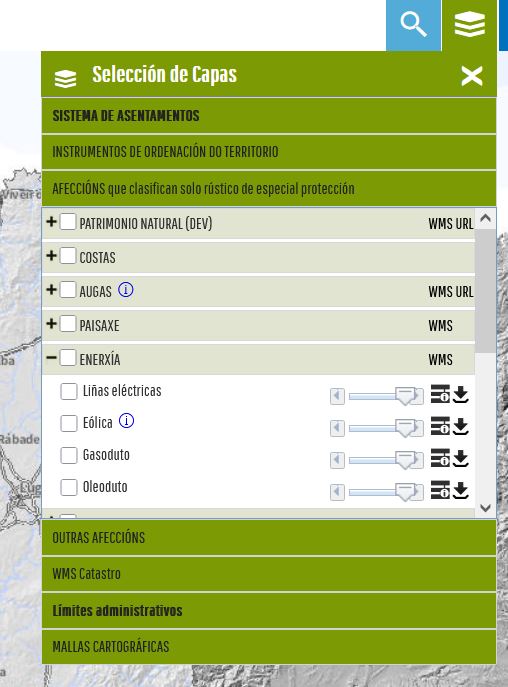
<p>To download the data you should follow the link shown in the image, but basically to the layers button &gt; Afeccións &gt; Enerxía &gt; Eólica.</p>

<figure class="post-figure">
    <img src="/assets/eolicos_1/download.JPG" alt="The way to download the data" />
    <figcaption>The way to download the data</figcaption>
</figure>

<p>This downloads a `.zip` file containing multiple formats, which is useful depending on your specific goal. For the visualizations in this article, I used the `.shp` (Shapefile) format, though the other files may contain different/more detailed data. In particular, the `.shp` has the following columns: <code class="language-plaintext highlighter-rouge">'OBJECTID', 'INFRAEST', 'NOME', 'ETRS89_X', 'ETRS89_Y', 'DIAM', 'ALT', 'NUM_ESTADO', 'SITUACION', 'geometry'</code>. An example would be:</p>

<p><br /></p>
<div class="language-plaintext highlighter-rouge"><div class="highlight"><pre class="highlight"><code>OBJECTID 2
INFRAEST AEROXERADOR
NOME PAXAREIRAS I
ETRS89_X 494628
ETRS89_Y 4.74572e+06
DIAM 44
ALT 40
NUM_ESTADO 5
SITUACION FUNCIONANDO, AUTORIZADO, EN OBRAS
geometry POINT (494628.4946999181 4745723.399695537)
</code></pre></div></div>
<p><br />
As you can see and probably guess seeing the data, the `SITUACION` field is useless, every one has the same values. The rest of the data can be useful, though.</p>

<h1 id="the-visualization">The visualization</h1>

<p>Since the goal was just visualization, I wanted to try [kepler.gl](https://kepler.gl/). For the data to be correctly rendered there, it must be reprojected. The Xunta data is provided in CRS 29N (the UTM zone for Galicia), but Kepler requires WGS 84 (EPSG:4326), which is the global standard. Since millimetric precision is not a concern for these visuals, we can perform the conversion easily using <code class="language-plaintext highlighter-rouge">geopandas</code>
<br /></p>

<div class="language-python highlighter-rouge"><div class="highlight"><pre class="highlight"><code><span class="kn">import</span> <span class="nn">geopandas</span> <span class="k">as</span> <span class="n">gpd</span>

<span class="n">eolicos_gdf</span> <span class="o">=</span> <span class="n">gpd</span><span class="p">.</span><span class="n">read_file</span><span class="p">(</span><span class="s">"your_path.shp"</span><span class="p">)</span>
<span class="n">eolicos_wgs84</span> <span class="o">=</span> <span class="n">eolicos_gdf</span><span class="p">.</span><span class="n">to_crs</span><span class="p">(</span><span class="s">"EPSG:4326"</span><span class="p">)</span>
<span class="n">eolicos_wgs84</span><span class="p">.</span><span class="n">to_file</span><span class="p">(</span><span class="s">"your_output_file.geojson"</span><span class="p">,</span> <span class="n">driver</span><span class="o">=</span><span class="s">"GeoJSON"</span><span class="p">)</span>
</code></pre></div></div>
<p><br /></p>

<p>Additionally, for a more interesting visualization, i wanted to leverage the data within the <code class="language-plaintext highlighter-rouge">.shp</code>. This way, by reading both the height (<code class="language-plaintext highlighter-rouge">ALT</code>) and diameter (<code class="language-plaintext highlighter-rouge">DIAM</code>) we can create a more informative 3D visualization. For that, in terms of changes in the output file, we just need to extract the radious from the diameter and add it to the output <code class="language-plaintext highlighter-rouge">.geojson</code>. To do that we change the geometry from single points to actual polygons (circles):</p>

<p><br /></p>

<div class="language-python highlighter-rouge"><div class="highlight"><pre class="highlight"><code><span class="kn">import</span> <span class="nn">geopandas</span> <span class="k">as</span> <span class="n">gpd</span>

<span class="n">eolicos_gdf</span> <span class="o">=</span> <span class="n">gpd</span><span class="p">.</span><span class="n">read_file</span><span class="p">(</span><span class="s">"your_path.shp"</span><span class="p">)</span>
<span class="n">eolicos_gdf</span><span class="p">[</span><span class="s">'geometry'</span><span class="p">]</span> <span class="o">=</span> <span class="n">eolicos_gdf</span><span class="p">.</span><span class="n">geometry</span><span class="p">.</span><span class="nb">buffer</span><span class="p">(</span><span class="n">radii</span><span class="p">)</span>
<span class="n">eolicos_wgs84</span> <span class="o">=</span> <span class="n">eolicos_gdf</span><span class="p">.</span><span class="n">to_crs</span><span class="p">(</span><span class="s">"EPSG:4326"</span><span class="p">)</span>
<span class="n">eolicos_wgs84</span><span class="p">.</span><span class="n">to_file</span><span class="p">(</span><span class="s">"your_output_file.geojson"</span><span class="p">,</span> <span class="n">driver</span><span class="o">=</span><span class="s">"GeoJSON"</span><span class="p">)</span>
</code></pre></div></div>
<p><br /></p>

<p>Next, we can upload the file to kepler.gl and select the height field, mapping it to the <code class="language-plaintext highlighter-rouge">ALT</code> field in the geojson. That should output something like:</p>

<figure class="map-container">
    <iframe src="/assets/eolicos_1/kepler_map_1.html" width="100%" height="600px">
    </iframe>
    <figcaption>
        Interactive 3D Map: Wind turbine height and diameter in Galicia.
    </figcaption>
</figure>

<p>Additionally, using the plain <code class="language-plaintext highlighter-rouge">.geojson</code> I also created other visualization a heatmap-like one, to visualize where there are more wind turbines (the streght of the color is determined by height as a proxy for output power).</p>

<figure class="map-container">
    <iframe src="/assets/eolicos_1/kepler_map_2.html" width="100%" height="600px" style="border:none;"></iframe>
    <figcaption>
        Interactive 2D Map: Wind turbine heatmap.
    </figcaption>
</figure>]]></content><author><name></name></author><summary type="html"><![CDATA[Mapping the wind farms of Galicia: data sources, processing, and interactive web maps of turbine locations.]]></summary><media:thumbnail xmlns:media="http://search.yahoo.com/mrss/" url="https://aburro.me/assets/eolicos_1/card.png" /><media:content medium="image" url="https://aburro.me/assets/eolicos_1/card.png" xmlns:media="http://search.yahoo.com/mrss/" /></entry><entry xml:lang="en"><title type="html">Characterizing the behaviour of bateas under SAR</title><link href="https://aburro.me/en/2026/04/02/batea_SAR/" rel="alternate" type="text/html" title="Characterizing the behaviour of bateas under SAR" /><published>2026-04-02T00:00:00+00:00</published><updated>2026-04-02T00:00:00+00:00</updated><id>https://aburro.me/en/2026/04/02/batea_SAR</id><content type="html" xml:base="https://aburro.me/en/2026/04/02/batea_SAR/"><![CDATA[<h1 id="intro">Intro</h1>

<p>A “<a href="https://gl.wikipedia.org/wiki/Batea">batea</a>” is a kind of raft/floating structure made up of a <em>lattice</em> of wood beams combined with floats from which ropes, perpendicular to the raft iself, sink into the water allowing seafood, mostly mussels to grow.</p>

<p>Detecting these in visible Earth Observation (EO) images is relatively simple (given appropriate resolution) except for the fact that Galicia is notably cloudy. Thus, trying to monitor these with, for instance Sentinel 2, would mean staring the whole winter at a white wall of clouds. To build an observation system that works year-round, you have to drop the camera and pick up a microwave (only <em>partially</em> metaphorically). The tool for the job would be a Synthetic Aperture Radar (SAR) much like the one on Sentinel 1. Radar doesn’t care about clouds, in fact it goes through them. _What it does care about, a lot, is geometry.</p>

<p>Under normal circumstances, with calm water, a phenomenon called Specular reflection comes into play. SAR instruments cast microwaves from orbit to earth and then try to pick back what the terrain reflected. The smooth ocean surface deflects the  radar pulse <em>away</em> from the satellite, causing calm water to appear dark. This easily contrasts with the bateas which are, essentially in this setting, corner reflectors. The pulse hits the flat water next to the raft, bounces upward into the vertical side of a beam and then shoots straight back at the satellite. This double bounce creates a strong signal that, despite the size of the bateas themselves and the <em>low</em> resolution of Sentinel 1, should be easily visible in the images.</p>

<h1 id="the-data">The data</h1>
<div style="text-indent: 0 !important; padding-left: 0 !important; margin-left: 0 !important; margin-bottom: 20px; display: block; width: 100%;"> 

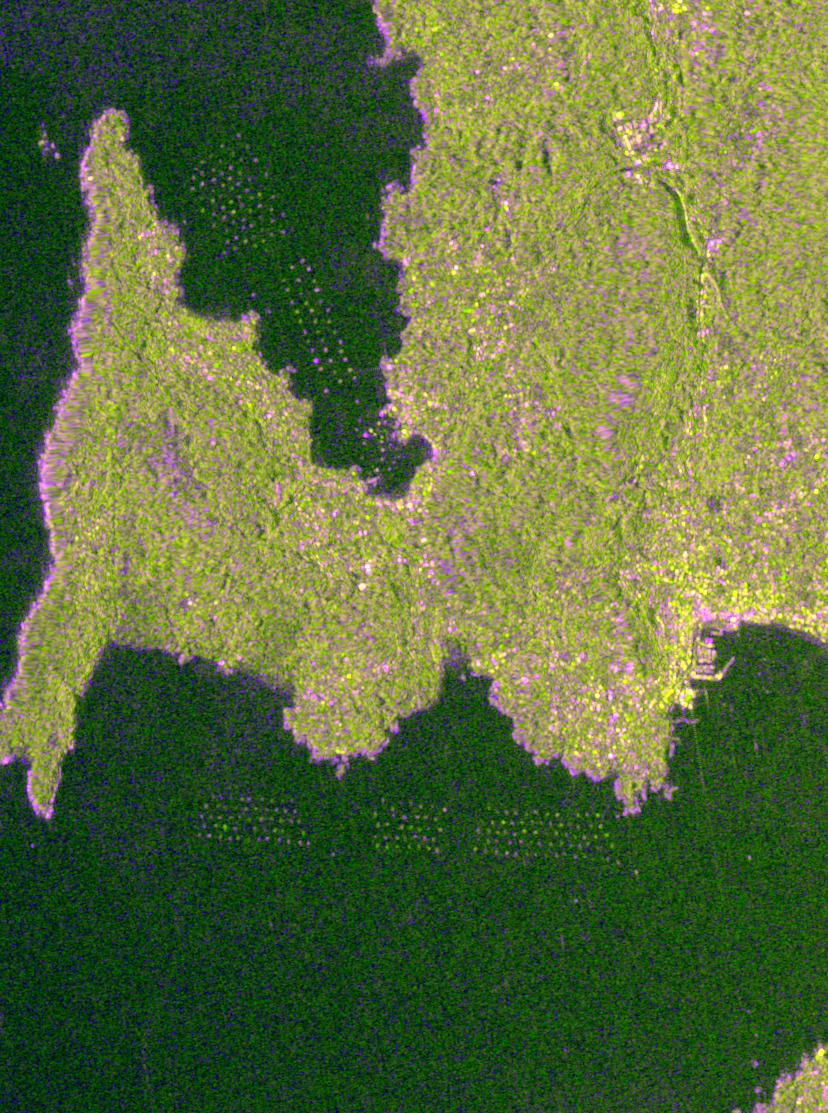
To test this, I downloaded some Sentinel 1 RTC data from [Planetary Computer](https://planetarycomputer.microsoft.com/dataset/sentinel-1-rtc) and created a sort of fake color composite. In this composite, red band corresponds to the VV data, the green channel to VH and the blue channel to the difference of both (VV-VH). In particular, the data has been transformed to decibels and normalized, following a bit of an ad-hoc approach (i.e. i just eyeballed it):
</div>

<div class="language-python highlighter-rouge"><div class="highlight"><pre class="highlight"><code>    <span class="k">def</span> <span class="nf">normalize_band</span><span class="p">(</span><span class="n">data</span><span class="p">,</span> <span class="n">vmin</span><span class="p">,</span> <span class="n">vmax</span><span class="p">):</span>
        <span class="n">clipped</span> <span class="o">=</span> <span class="n">np</span><span class="p">.</span><span class="n">clip</span><span class="p">(</span><span class="n">data</span><span class="p">,</span> <span class="n">vmin</span><span class="p">,</span> <span class="n">vmax</span><span class="p">)</span>
        <span class="k">return</span> <span class="p">((</span><span class="n">clipped</span> <span class="o">-</span> <span class="n">vmin</span><span class="p">)</span> <span class="o">/</span> <span class="p">(</span><span class="n">vmax</span> <span class="o">-</span> <span class="n">vmin</span><span class="p">)</span> <span class="o">*</span> <span class="mf">255.0</span><span class="p">).</span><span class="n">astype</span><span class="p">(</span><span class="n">np</span><span class="p">.</span><span class="n">uint8</span><span class="p">)</span>

    <span class="n">vv_db</span> <span class="o">=</span> <span class="mi">10</span> <span class="o">*</span> <span class="n">np</span><span class="p">.</span><span class="n">log10</span><span class="p">(</span><span class="n">vv_raw</span><span class="p">)</span>
    <span class="n">vh_db</span> <span class="o">=</span> <span class="mi">10</span> <span class="o">*</span> <span class="n">np</span><span class="p">.</span><span class="n">log10</span><span class="p">(</span><span class="n">vh_raw</span><span class="p">)</span>
    <span class="n">diff_db</span> <span class="o">=</span> <span class="n">vv_db</span> <span class="o">-</span> <span class="n">vh_db</span>

    <span class="n">R_channel</span> <span class="o">=</span> <span class="n">normalize_band</span><span class="p">(</span><span class="n">vv_db</span><span class="p">,</span> <span class="o">-</span><span class="mi">25</span><span class="p">,</span> <span class="mi">0</span><span class="p">)</span>
    <span class="n">G_channel</span> <span class="o">=</span> <span class="n">normalize_band</span><span class="p">(</span><span class="n">vh_db</span><span class="p">,</span> <span class="o">-</span><span class="mi">30</span><span class="p">,</span> <span class="o">-</span><span class="mi">5</span><span class="p">)</span>
    <span class="n">B_channel</span> <span class="o">=</span> <span class="n">normalize_band</span><span class="p">(</span><span class="n">diff_db</span><span class="p">,</span> <span class="mi">0</span><span class="p">,</span> <span class="mi">15</span><span class="p">)</span>
</code></pre></div></div>

<h1 id="the-output">The output</h1>

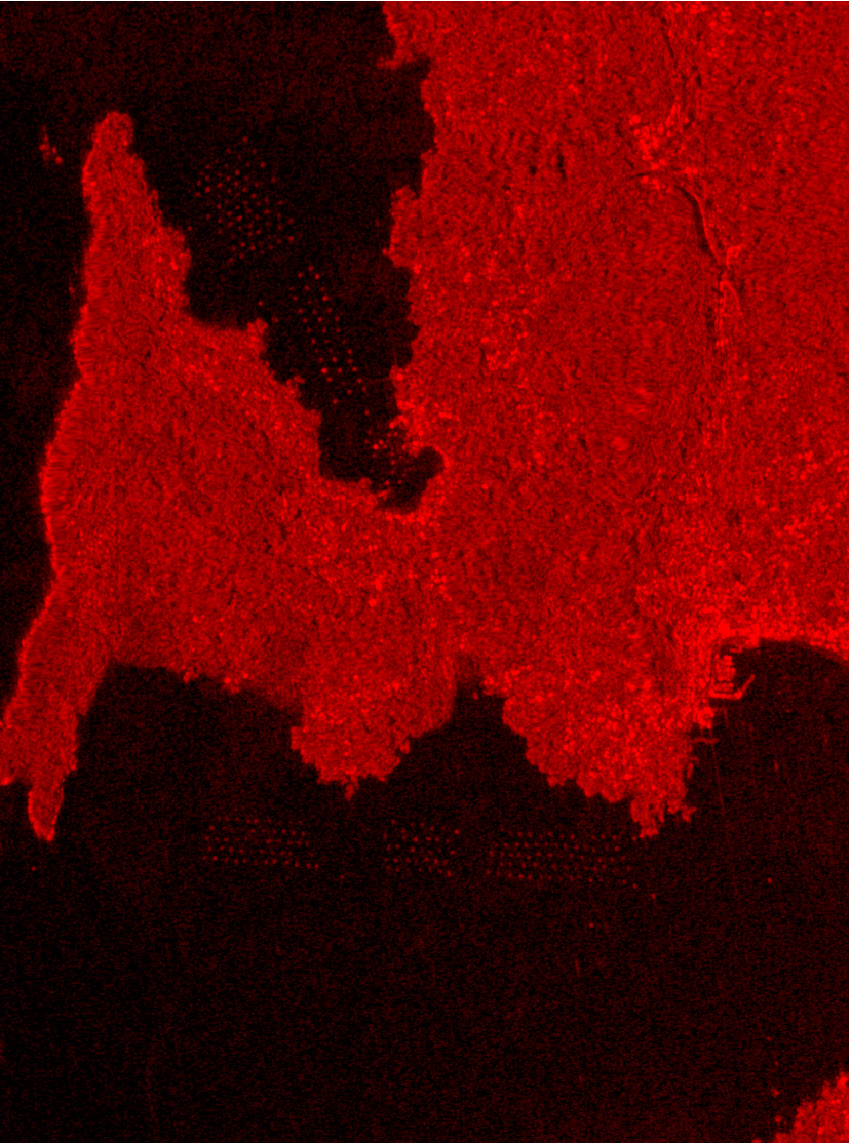
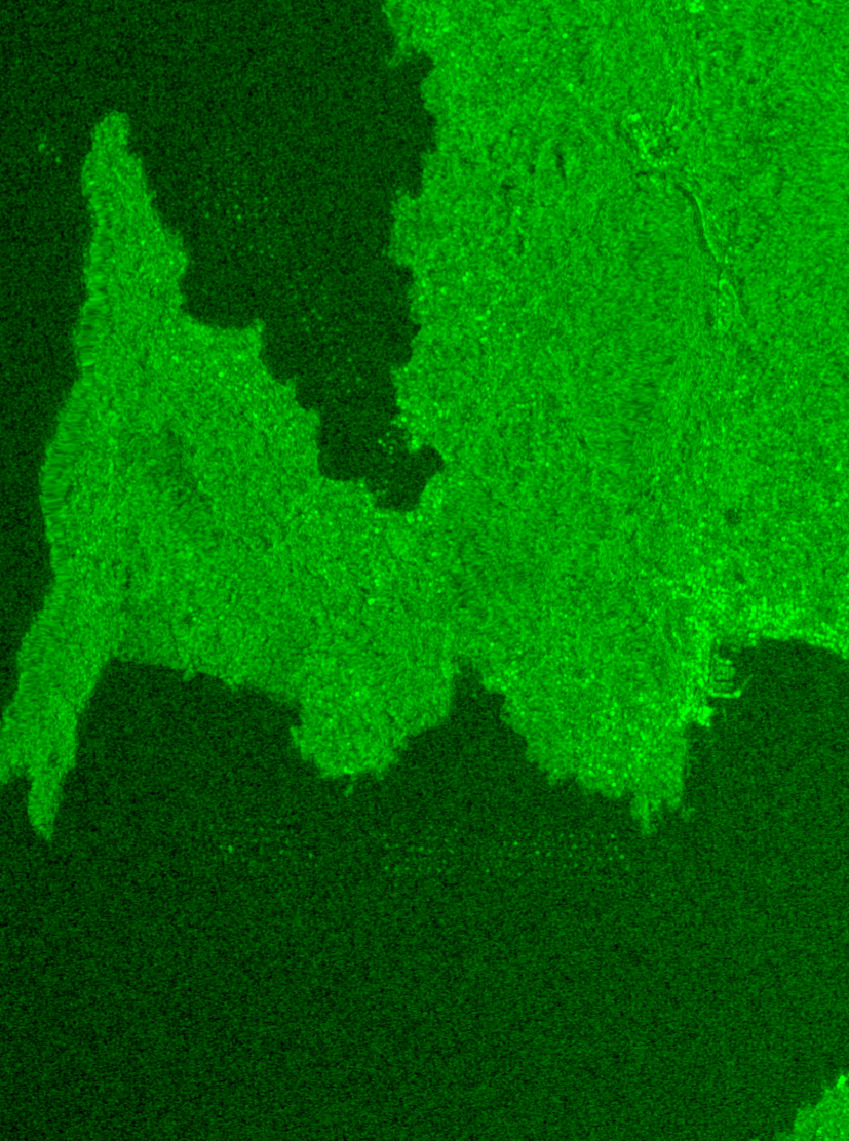
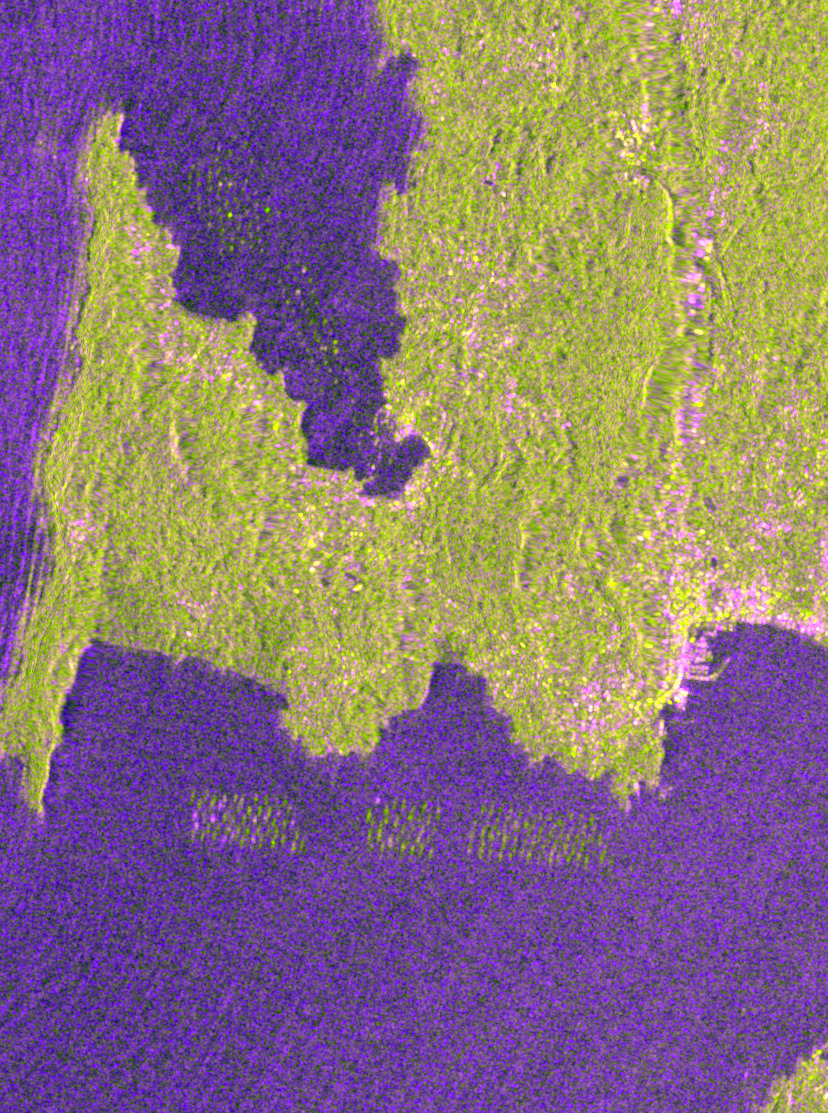
<p>Upon visualizing the images it became clear the bateas were visible despite their size (notice the little dots on the black sea in the images below).</p>

<div style="display: flex; justify-content: space-between; align-items: flex-start; margin-bottom: 20px;">
  <div style="width: 30%; text-align: center;">
    <img src="/assets/bateas/batea_master_rgb_20230130.jpg" alt="Calm sea fake-color composite RGB" style="width: 100%;" />
    <p style="font-size: 0.85em; color: #666; margin-top: 5px;">Calm sea fake-color composite RGB </p>
  </div>
  <div style="width: 30%; text-align: center;">
    <img src="/assets/bateas/calm_vv.jpg" alt="Calm VV" style="width: 100%;" />
    <p style="font-size: 0.85em; color: #666; margin-top: 5px;">Calm sea VV Polarization</p>
  </div>
  <div style="width: 30%; text-align: center;">
    <img src="/assets/bateas/calm_vh.jpg" alt="Calm VH" style="width: 100%;" />
    <p style="font-size: 0.85em; color: #666; margin-top: 5px;">Calm sea VH Polarization</p>
  </div>
</div>

<div style="text-indent: 0 !important; padding-left: 0 !important; margin-left: 0 !important; margin-bottom: 20px; display: block; width: 100%;"> 
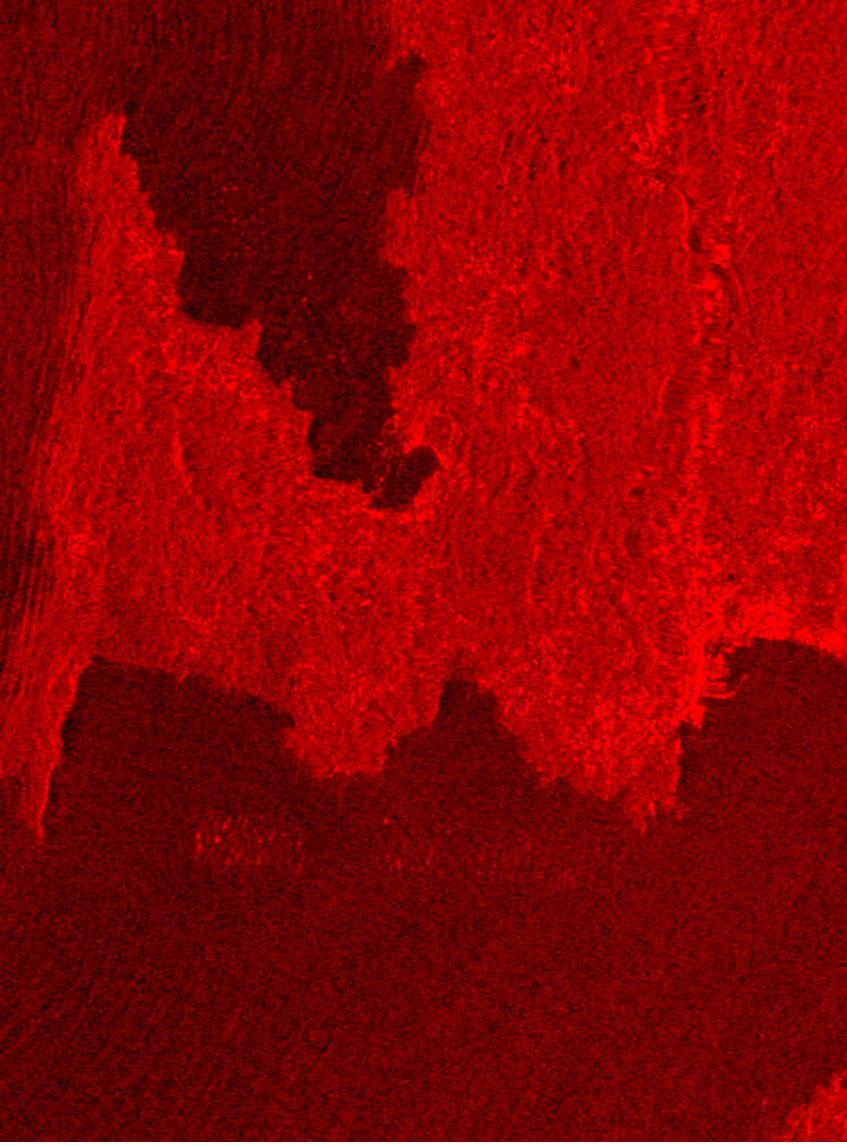
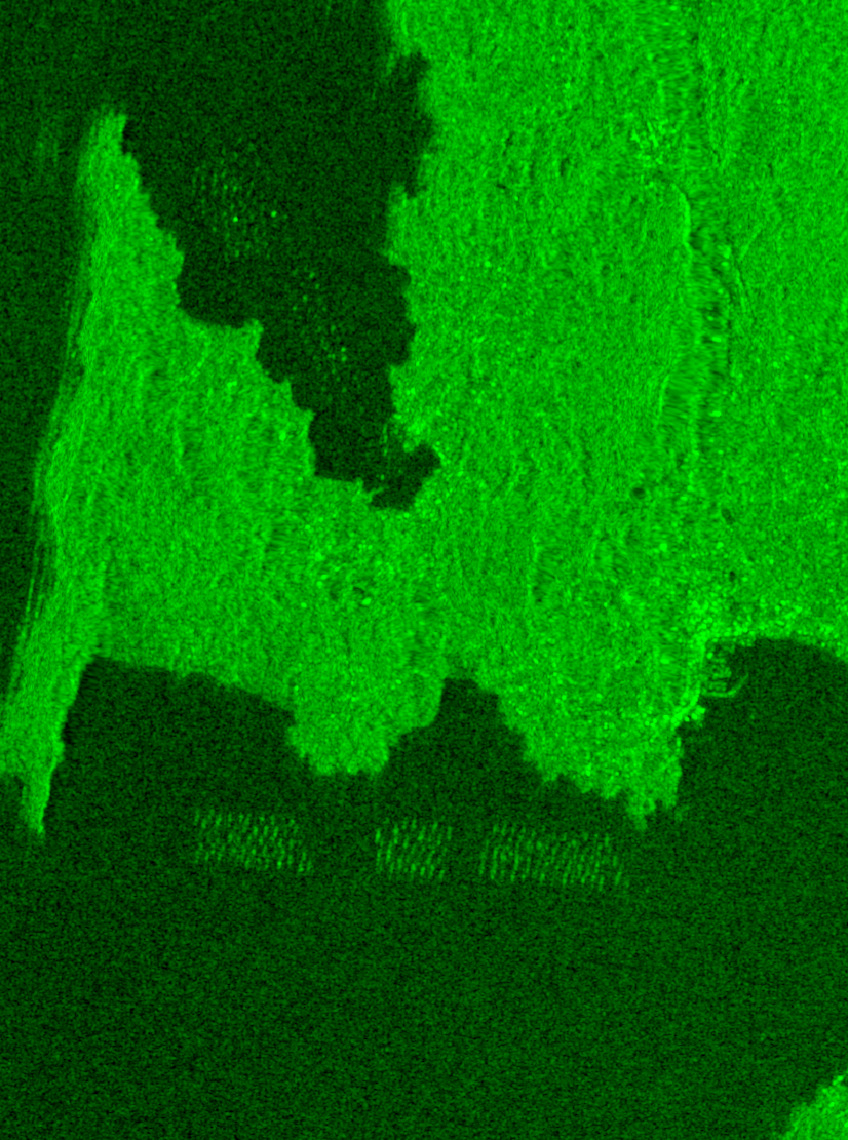
  However, on choppy sea, the identification is a bit more complex. Firstly, the small blobs became lines and, secondly, they become less defined, with clear interaction between VV and VH which reflects on the image as the color violet. In particular, comparing the VV polarization images from the choppy and the calm sea we can see quite a difference. In the calm sea the VV polarization is more clear offering sharper bateas whereas in choppy sea the VV barely allows to differentiate a few bateas while in the VH you can clearly see each one (even if they are more akin to lines than blobs).
</div>

<div style="display: flex; justify-content: space-between; align-items: flex-start; margin-top: 20px; margin-bottom: 20px;">
  <div style="width: 30%; text-align: center;">
    <img src="/assets/bateas/batea_master_rgb_20230313.jpg" alt="Choppy sea fake-color composite RGB" style="width: 100%;" />
    <p style="font-size: 0.85em; color: #666; margin-top: 5px;">Choppy sea fake-color composite RGB</p>
  </div>
  <div style="width: 30%; text-align: center;">
    <img src="/assets/bateas/choppy_vv.jpg" alt="Choppy VV" style="width: 100%;" />
    <p style="font-size: 0.85em; color: #666; margin-top: 5px;">VV Polarization</p>
  </div>
  <div style="width: 30%; text-align: center;">
    <img src="/assets/bateas/choppy_vh.jpg" alt="Choppy VH" style="width: 100%;" />
    <p style="font-size: 0.85em; color: #666; margin-top: 5px;">VH Polarization</p>
  </div>
</div>
<div style="text-indent: 0 !important; padding-left: 0 !important; margin-left: 0 !important; margin-bottom: 20px; display: block; width: 100%;"> 

The choppy sea does send the signal back to the satellite due to the waves, this makes the baseline level of the sea climb to the same as the bateas eliminating the contrast. VH does still show contrast due to the different polarization. For a radar pulse to return to the satellite in the cross-polarized (VH) channel, it needs to _change its original polarization_, that is, changing from the sources vertical to horizontal, before bouncing back to be picked up by the satellite. The ocean's surface, even full of waves, can just redirect the signal, but it cannot easily scramble its polarization. A batea, on the other hand, is a dense lattice of wooden beams, ropes, floaters and other stuff. The radar signal enters that structure, bounces repeatedly off hard surfaces at different angles, and exits with its polarization shifted. This way, the sea stays relatively dark in VH while the bateas remain bright, maintaining the contrast even in stormy conditions.
</div>]]></content><author><name></name></author><summary type="html"><![CDATA[Detecting mussel rafts (bateas) in Galicia with Sentinel-1 SAR: how sea state affects the radar return in VV and VH polarisations.]]></summary><media:thumbnail xmlns:media="http://search.yahoo.com/mrss/" url="https://aburro.me/assets/bateas/card.png" /><media:content medium="image" url="https://aburro.me/assets/bateas/card.png" xmlns:media="http://search.yahoo.com/mrss/" /></entry></feed>