Intro
The Xunta offers freely data regarding the locations and characteristics of the wind turbines in Galicia. For what concerns this post, I will just use this data to create visualizations of the turbines themselves.
The data
To download the data you should follow the link shown in the image, but basically to the layers button > Afeccións > Enerxía > Eólica.
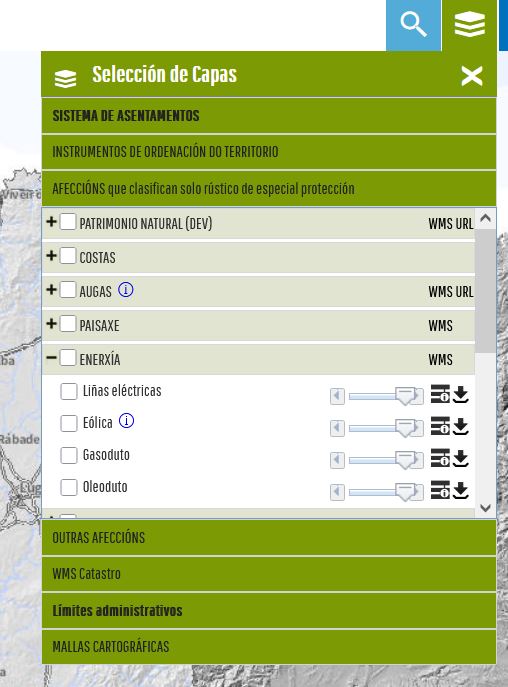
The way to download the data
This downloads a `.zip` file containing multiple formats, which is useful depending on your specific goal. For the visualizations in this article, I used the `.shp` (Shapefile) format, though the other files may contain different/more detailed data. In particular, the `.shp` has the following columns: 'OBJECTID', 'INFRAEST', 'NOME', 'ETRS89_X', 'ETRS89_Y', 'DIAM', 'ALT', 'NUM_ESTADO', 'SITUACION', 'geometry'. An example would be:
OBJECTID 2
INFRAEST AEROXERADOR
NOME PAXAREIRAS I
ETRS89_X 494628
ETRS89_Y 4.74572e+06
DIAM 44
ALT 40
NUM_ESTADO 5
SITUACION FUNCIONANDO, AUTORIZADO, EN OBRAS
geometry POINT (494628.4946999181 4745723.399695537)
As you can see and probably guess seeing the data, the `SITUACION` field is useless, every one has the same values. The rest of the data can be useful, though.
The visualization
Since the goal was just visualization, I wanted to try [kepler.gl](https://kepler.gl/). For the data to be correctly rendered there, it must be reprojected. The Xunta data is provided in CRS 29N (the UTM zone for Galicia), but Kepler requires WGS 84 (EPSG:4326), which is the global standard. Since millimetric precision is not a concern for these visuals, we can perform the conversion easily using geopandas
import geopandas as gpd

eolicos_gdf = gpd.read_file("your_path.shp")
eolicos_wgs84 = eolicos_gdf.to_crs("EPSG:4326")
eolicos_wgs84.to_file("your_output_file.geojson", driver="GeoJSON")
Additionally, for a more interesting visualization, i wanted to leverage the data within the .shp. This way, by reading both the height (ALT) and diameter (DIAM) we can create a more informative 3D visualization. For that, in terms of changes in the output file, we just need to extract the radious from the diameter and add it to the output .geojson. To do that we change the geometry from single points to actual polygons (circles):
import geopandas as gpd

eolicos_gdf = gpd.read_file("your_path.shp")
eolicos_gdf['geometry'] = eolicos_gdf.geometry.buffer(radii)
eolicos_wgs84 = eolicos_gdf.to_crs("EPSG:4326")
eolicos_wgs84.to_file("your_output_file.geojson", driver="GeoJSON")
Next, we can upload the file to kepler.gl and select the height field, mapping it to the ALT field in the geojson. That should output something like:
Interactive 3D Map: Wind turbine height and diameter in Galicia.
Additionally, using the plain .geojson I also created other visualization a heatmap-like one, to visualize where there are more wind turbines (the streght of the color is determined by height as a proxy for output power).
Interactive 2D Map: Wind turbine heatmap.